About

Lencana Facebook

Popular Posts
-
Walaupun bagi para pengguna Internet umumnya kita hanya perlu mengenal hostname dari mesin yang dituju, seperti: server.indo....
-
Sebagian besar fungsi yang dapat melakukan desktop juga dapat dilakukan oleh laptop. Namun, kedua jenis komputer yang dibangun sangat berbed...
-
Sebelum kita langsung membahas tentang konfigurasi radio mikrotik, ada baiknya kita tahu terbelebih dahulu apa saja contoh dari wirel...
-
Cara Instalasi XAMPP XAMPP merupakan sebuah paket instalasi untuk PHP , APACHE dan MySQL . Dengan menggunakan XAMPP, kita tidak perlu l...
-
 Cara Menghilangkan Icon Recycle Bin Pada Desktop di Windows 7 . Recycle Bin adalah tempat penyimpanan sementara file-file dan folder-fo...


Popular Posts
-
Walaupun bagi para pengguna Internet umumnya kita hanya perlu mengenal hostname dari mesin yang dituju, seperti: server.indo....
-
Sebagian besar fungsi yang dapat melakukan desktop juga dapat dilakukan oleh laptop. Namun, kedua jenis komputer yang dibangun sangat berbed...
-
Sebelum kita langsung membahas tentang konfigurasi radio mikrotik, ada baiknya kita tahu terbelebih dahulu apa saja contoh dari wirel...
-
Cara Instalasi XAMPP XAMPP merupakan sebuah paket instalasi untuk PHP , APACHE dan MySQL . Dengan menggunakan XAMPP, kita tidak perlu l...
-
Cara Menghilangkan Icon Recycle Bin Pada Desktop di Windows 7 . Recycle Bin adalah tempat penyimpanan sementara file-file dan folder-fo...
Jumat, 25 November 2011
Linux Top up
| ||||
| ||||
| ||||
| ||||
| ||||
| ||||
| ||||
| ||||
| ||||
| ||||
| ||||
|


Minggu, 13 November 2011
"Bandingkan dan desktop kontras dan komponen laptop"
Sebagian besar fungsi yang dapat melakukan desktop juga dapat dilakukan oleh laptop. Namun, kedua jenis komputer yang dibangun sangat berbeda dan bagian-bagian yang tidak dapat dipertukarkan. Sebagai contoh, sebuah pesawat dan helikopter dapat setiap perjalanan ke tujuan yang sama, tetapi mereka tidak dapat diperbaiki dengan suku cadang yang sama. Hal ini juga berlaku untuk laptop dan desktop. Beberapa komponen dapat dibagi antara desktop dan laptop.
Komponen Desktop cenderung standar. Mereka biasanya bertemu dengan faktor bentuk yang universal. Desktop yang dibuat oleh produsen yang berbeda dapat sering menggunakan komponen yang sama. Sebuah drive DVD / CD-RW adalah contoh dari komponen desktop yang memiliki faktor bentuk standar.
Komponen laptop jauh lebih khusus dari komponen desktop. Perbedaan ini karena produsen laptop fokus pada memperbaiki komponen laptop untuk membuat mereka lebih efisien dan kompak. Akibatnya, komponen desain laptop produsen untuk mengikuti faktor bentuk spesifik mereka sendiri. Komponen laptop adalah proprietary. Akibatnya, Anda mungkin tidak dapat menggunakan komponen yang dibuat oleh salah satu produsen laptop untuk memperbaiki laptop yang dibuat oleh produsen lain.
CATATAN: Teknisi mungkin harus mendapatkan sertifikasi untuk setiap produsen laptop yang mereka dukung.
Setelah menyelesaikan bagian ini, anda akan memenuhi tujuan tersebut:
Bandingkan dan desktop motherboard kontras dan laptop.
Bandingkan dan kontras desktop dan laptop prosesor.
Bandingkan dan desktop kontras dan manajemen daya laptop.
Bandingkan dan desktop kontras dan kemampuan laptop ekspansi.
Bandingkan dan desktop motherboard kontras dan laptop
Motherboard desktop memiliki faktor bentuk standar. Ukuran standar dan bentuk memungkinkan motherboard dari produsen yang berbeda untuk saling dipertukarkan.
Motherboard laptop bervariasi oleh produsen dan adalah proprietary. Ketika Anda memperbaiki laptop, sangat disarankan agar Anda mendapatkan penggantian motherboard dari produsen laptop. Gambar 1 menunjukkan sebuah motherboard desktop dan laptop motherboard.
(Gambar ditampilkan pada kesempatan berikutnya)
Laptop motherboard dan motherboard desktop dirancang berbeda. Komponen dirancang untuk laptop umumnya tidak dapat digunakan dalam desktop.
Bandingkan dan kontras desktop dan laptop prosesor
Unit pengolahan pusat (CPU), atau prosesor, adalah otak dari komputer. CPU menginterpretasi dan proses instruksi yang digunakan untuk memanipulasi data.
Prosesor laptop yang dirancang untuk menggunakan daya yang lebih kecil dan membuat panas lebih sedikit dibandingkan prosesor desktop. Akibatnya, prosesor laptop tidak memerlukan perangkat pendinginan yang besar seperti yang ditemukan di desktop. Prosesor laptop juga menggunakan CPU throttling untuk memodifikasi kecepatan clock yang diperlukan untuk mengurangi konsumsi daya dan panas. Hal ini menyebabkan sedikit penurunan kinerja. Hal ini juga meningkatkan umur beberapa komponen. Prosesor ini dirancang khusus memungkinkan laptop untuk beroperasi untuk jangka waktu lebih lama bila menggunakan sumber daya baterai.
CATATAN: Teknisi harus merujuk ke manual laptop untuk prosesor yang dapat digunakan sebagai pengganti prosesor dan untuk instruksi prosesor pengganti.
Bandingkan dan desktop kontras dan manajemen daya laptop
Manajemen daya kontrol aliran listrik ke komponen dari sebuah komputer.
Desktop biasanya didirikan di lokasi di mana mereka tetap dicolokkan ke sumber listrik. Manajemen daya Desktop mendistribusikan listrik dari sumber ke komponen desktop. Ada juga baterai kecil di desktop yang menyediakan listrik untuk menjaga jam internal dan pengaturan BIOS ketika desktop dimatikan.
Laptop kecil dan portabel. Portabilitas fitur ini dicapai dengan menggabungkan ukuran yang kecil dan berat dari sebuah laptop dengan kemampuan untuk beroperasi dari baterai. Ketika laptop terpasang, manajemen daya laptop mengirim listrik dari sumber listrik AC ke komponen laptop. Manajemen daya laptop juga mengisi kembali baterai. Ketika laptop dicabut, manajemen daya laptop mengambil listrik dari baterai dan mengirimkannya ke komponen laptop.
Ada dua metode manajemen daya:
· Advanced Power Management (APM)
· Advanced Konfigurasi dan Power Interface (ACPI)
APM adalah versi sebelumnya dari manajemen daya. Dengan APM, BIOS digunakan untuk mengontrol pengaturan manajemen daya.
ACPI telah menggantikan APM. ACPI menawarkan fitur manajemen daya tambahan. Dengan ACPI, sistem operasi kontrol manajemen daya.
Bandingkan dan desktop kontras dan kemampuan ekspansi laptop
Kemampuan ekspansi menambahkan fungsionalitas ke komputer. Banyak perangkat ekspansi dapat digunakan dengan baik laptop dan desktop:
· Eksternal drive
· Modem
· Jaringan kartu
· Wireless adapter
· Printer
· Lain-lain periferal
Perangkat ekspansi melekat pada laptop dan desktop yang berbeda. Sebuah desktop yang menempel perangkat ini dengan USB serial, paralel, dan port FireWire. Sebuah laptop menempel perangkat ini dengan port yang sama dan Kartu PC.
Penggunaan standar USB dan FireWire port memungkinkan untuk menghubungkan banyak jenis komponen eksternal untuk laptop, docking stasiun, replikator port, dan desktop. USB dan standar FireWire memungkinkan untuk menghubungkan dan menghapus komponen eksternal tanpa perlu mematikan sistem. USB dan FireWire port digunakan untuk menghubungkan berbagai komponen eksternal:
· Printer
· Scanner
· Floppy disk drive
· Tikus
· Kamera
· Keyboard
· Hard drive
· Flash drive
· Optical drive
· MP3 player
Laptop dan desktop memiliki kemampuan ekspansi yang sama. Ini adalah perbedaan dalam faktor bentuk antara komputer yang menentukan jenis perangkat ekspansi digunakan. Desktop memiliki teluk internal yang mendukung 5,25 "dan 3,5" drive. Selain itu, ada ruang untuk menginstal drive lain ekspansi permanen. Laptop memiliki ruang terbatas, karena itu, teluk ekspansi pada laptop yang dirancang untuk memungkinkan berbagai jenis drive untuk masuk ke dalam teluk yang sama. Drive hot-swappable dan dimasukkan atau dihapus sesuai kebutuhan.
Laptop menggunakan slot PC Card untuk menambah fungsionalitas. Slot PC Card menggunakan antarmuka standar terbuka untuk menghubungkan ke perangkat periferal menggunakan standar CardBus. Berikut adalah beberapa contoh perangkat yang terhubung menggunakan Kartu PC:
· Memori
· Modem
· Hard drive
· Jaringan kartu
Kartu PC mengikuti standar PCMCIA. Mereka datang dalam tiga jenis: Tipe I, Tipe II, dan Tipe III. Setiap jenis PC Card berbeda dalam ukuran dan dapat melampirkan ke perangkat yang berbeda. Jenis yang lebih baru PC Card ExpressCard disebut PC. ExpressCard PC datang dalam lebar 34mm dan 54mm ..
Komponen Desktop cenderung standar. Mereka biasanya bertemu dengan faktor bentuk yang universal. Desktop yang dibuat oleh produsen yang berbeda dapat sering menggunakan komponen yang sama. Sebuah drive DVD / CD-RW adalah contoh dari komponen desktop yang memiliki faktor bentuk standar.
Komponen laptop jauh lebih khusus dari komponen desktop. Perbedaan ini karena produsen laptop fokus pada memperbaiki komponen laptop untuk membuat mereka lebih efisien dan kompak. Akibatnya, komponen desain laptop produsen untuk mengikuti faktor bentuk spesifik mereka sendiri. Komponen laptop adalah proprietary. Akibatnya, Anda mungkin tidak dapat menggunakan komponen yang dibuat oleh salah satu produsen laptop untuk memperbaiki laptop yang dibuat oleh produsen lain.
CATATAN: Teknisi mungkin harus mendapatkan sertifikasi untuk setiap produsen laptop yang mereka dukung.
Setelah menyelesaikan bagian ini, anda akan memenuhi tujuan tersebut:
Bandingkan dan desktop motherboard kontras dan laptop.
Bandingkan dan kontras desktop dan laptop prosesor.
Bandingkan dan desktop kontras dan manajemen daya laptop.
Bandingkan dan desktop kontras dan kemampuan laptop ekspansi.
Bandingkan dan desktop motherboard kontras dan laptop
Motherboard desktop memiliki faktor bentuk standar. Ukuran standar dan bentuk memungkinkan motherboard dari produsen yang berbeda untuk saling dipertukarkan.
Motherboard laptop bervariasi oleh produsen dan adalah proprietary. Ketika Anda memperbaiki laptop, sangat disarankan agar Anda mendapatkan penggantian motherboard dari produsen laptop. Gambar 1 menunjukkan sebuah motherboard desktop dan laptop motherboard.
(Gambar ditampilkan pada kesempatan berikutnya)
Laptop motherboard dan motherboard desktop dirancang berbeda. Komponen dirancang untuk laptop umumnya tidak dapat digunakan dalam desktop.
Bandingkan dan kontras desktop dan laptop prosesor
Unit pengolahan pusat (CPU), atau prosesor, adalah otak dari komputer. CPU menginterpretasi dan proses instruksi yang digunakan untuk memanipulasi data.
Prosesor laptop yang dirancang untuk menggunakan daya yang lebih kecil dan membuat panas lebih sedikit dibandingkan prosesor desktop. Akibatnya, prosesor laptop tidak memerlukan perangkat pendinginan yang besar seperti yang ditemukan di desktop. Prosesor laptop juga menggunakan CPU throttling untuk memodifikasi kecepatan clock yang diperlukan untuk mengurangi konsumsi daya dan panas. Hal ini menyebabkan sedikit penurunan kinerja. Hal ini juga meningkatkan umur beberapa komponen. Prosesor ini dirancang khusus memungkinkan laptop untuk beroperasi untuk jangka waktu lebih lama bila menggunakan sumber daya baterai.
CATATAN: Teknisi harus merujuk ke manual laptop untuk prosesor yang dapat digunakan sebagai pengganti prosesor dan untuk instruksi prosesor pengganti.
Bandingkan dan desktop kontras dan manajemen daya laptop
Manajemen daya kontrol aliran listrik ke komponen dari sebuah komputer.
Desktop biasanya didirikan di lokasi di mana mereka tetap dicolokkan ke sumber listrik. Manajemen daya Desktop mendistribusikan listrik dari sumber ke komponen desktop. Ada juga baterai kecil di desktop yang menyediakan listrik untuk menjaga jam internal dan pengaturan BIOS ketika desktop dimatikan.
Laptop kecil dan portabel. Portabilitas fitur ini dicapai dengan menggabungkan ukuran yang kecil dan berat dari sebuah laptop dengan kemampuan untuk beroperasi dari baterai. Ketika laptop terpasang, manajemen daya laptop mengirim listrik dari sumber listrik AC ke komponen laptop. Manajemen daya laptop juga mengisi kembali baterai. Ketika laptop dicabut, manajemen daya laptop mengambil listrik dari baterai dan mengirimkannya ke komponen laptop.
Ada dua metode manajemen daya:
· Advanced Power Management (APM)
· Advanced Konfigurasi dan Power Interface (ACPI)
APM adalah versi sebelumnya dari manajemen daya. Dengan APM, BIOS digunakan untuk mengontrol pengaturan manajemen daya.
ACPI telah menggantikan APM. ACPI menawarkan fitur manajemen daya tambahan. Dengan ACPI, sistem operasi kontrol manajemen daya.
Bandingkan dan desktop kontras dan kemampuan ekspansi laptop
Kemampuan ekspansi menambahkan fungsionalitas ke komputer. Banyak perangkat ekspansi dapat digunakan dengan baik laptop dan desktop:
· Eksternal drive
· Modem
· Jaringan kartu
· Wireless adapter
· Printer
· Lain-lain periferal
Perangkat ekspansi melekat pada laptop dan desktop yang berbeda. Sebuah desktop yang menempel perangkat ini dengan USB serial, paralel, dan port FireWire. Sebuah laptop menempel perangkat ini dengan port yang sama dan Kartu PC.
Penggunaan standar USB dan FireWire port memungkinkan untuk menghubungkan banyak jenis komponen eksternal untuk laptop, docking stasiun, replikator port, dan desktop. USB dan standar FireWire memungkinkan untuk menghubungkan dan menghapus komponen eksternal tanpa perlu mematikan sistem. USB dan FireWire port digunakan untuk menghubungkan berbagai komponen eksternal:
· Printer
· Scanner
· Floppy disk drive
· Tikus
· Kamera
· Keyboard
· Hard drive
· Flash drive
· Optical drive
· MP3 player
Laptop dan desktop memiliki kemampuan ekspansi yang sama. Ini adalah perbedaan dalam faktor bentuk antara komputer yang menentukan jenis perangkat ekspansi digunakan. Desktop memiliki teluk internal yang mendukung 5,25 "dan 3,5" drive. Selain itu, ada ruang untuk menginstal drive lain ekspansi permanen. Laptop memiliki ruang terbatas, karena itu, teluk ekspansi pada laptop yang dirancang untuk memungkinkan berbagai jenis drive untuk masuk ke dalam teluk yang sama. Drive hot-swappable dan dimasukkan atau dihapus sesuai kebutuhan.
Laptop menggunakan slot PC Card untuk menambah fungsionalitas. Slot PC Card menggunakan antarmuka standar terbuka untuk menghubungkan ke perangkat periferal menggunakan standar CardBus. Berikut adalah beberapa contoh perangkat yang terhubung menggunakan Kartu PC:
· Memori
· Modem
· Hard drive
· Jaringan kartu
Kartu PC mengikuti standar PCMCIA. Mereka datang dalam tiga jenis: Tipe I, Tipe II, dan Tipe III. Setiap jenis PC Card berbeda dalam ukuran dan dapat melampirkan ke perangkat yang berbeda. Jenis yang lebih baru PC Card ExpressCard disebut PC. ExpressCard PC datang dalam lebar 34mm dan 54mm ..
Sabtu, 12 November 2011
Instalasi Fiber Optic (fiber optik)

Ukuran kabel fiber optic (fiber optik) terdiri dari dua jenis, yaitu kabel fiber optic (fiber optik) single mode dengan diameter ukuran 5Mikron, 9 Mikron atau 10Mikron dan kabel fiber optic (fiber optik) multi mode dengan diameter berukuran 50Mikron atau 62.5Mikron. Jadi sebagaimana diketahui, kabel fiber optic (fiber optik) adalah sebuah kaca murni yang panjang dan tipis serta berdiameter sebesar rambut manusia. Dan dalam pengunaannya beberapa kabel fiber optic (fiber optik) dijadikan satu dalam sebuah tempat yang dinamakan rack kabel fiber optic (fiber optik) dan digunakan untuk mengantarkan data digital yang berupa sinyal sinar dalam jarak yang sangat jauh.
Perkawinan antara komponen kabel fiber optic (fiber optik) dan elektronik serta penggunaan cahaya dari kabel fiber optic (fiber optik) itu sendiri
telah ikut meningkatkan kinerja kabel fiber optic (fiber optik) FO itu sendiri. Saat ini koneksi telepon internasional dan nasional telah menggunakan
media kabel fiber optic (fiber optik). Tak lama lagi kabel fiber optic (fiber optik) FO akan merubah cara kita menonton TV, menerima dan menggunakan
informasi. Konsep memanfaatkan cahaya kabel fiber optic (fiber optik) sebagai suatu alat komunikasi modern dimulai akhir abad ke-19 ketika Alexander
Graham Bell pada tahun 1880 merepresentasikan dan mematenkan penemuannya yang menggunakan cahaya dari kabel fiber optic (fiber optik) sebagai pentransmit
suara. Alat tersebut dikenal dengan photophone, menggunakan cahaya dan perangkat sensitif cahaya sebagai penerima dan menyiarkannya kembali dengan
mereproduksi suara manusia.
SETTING RADIO WIRELESS MIKROTIK

Sebelum kita langsung membahas tentang konfigurasi radio mikrotik, ada baiknya kita tahu terbelebih dahulu apa saja contoh dari wireless itu, contoh wireless itu sangat banyak sekali diantaranya itu ada WLM54G, WLM54A/G, TP-LINK, CM9, CM10, 3COM, R52H, XR-5 dan lainnya. ok langsung aja kita bahas Beberapa konfigurasi inti yang harus di setting pada radio wireleess miktrotik :
/interface wireless
set wlan1 band=5ghz
set wlan1 frequency=5425
set wlan1 mode=ap-bridge
set wlan1 ssid=blues
set wlan1 rate-set=default
set wlan1 wds-ignore-ssid=yes
set wlan1 wds-mode=dynamic
set wlan1 scan-list=5100-5900
set wlan1 radio-name=jawara-udara
set wlan1 band=5ghz
set wlan1 frequency=5425
set wlan1 mode=ap-bridge
set wlan1 ssid=blues
set wlan1 rate-set=default
set wlan1 wds-ignore-ssid=yes
set wlan1 wds-mode=dynamic
set wlan1 scan-list=5100-5900
set wlan1 radio-name=jawara-udara
/tool graphing set store-every=24hours
/system logging action set disk target=memory memory-stop-on-full=yes
/ip firewall connection tracking set enabled=no
/system logging action set disk target=memory memory-stop-on-full=yes
/ip firewall connection tracking set enabled=no
/interface wireless set wlan0 disabled=no
Note :
- itu adalah beberapa konfigurasi yang harus kita setting untuk menghubungkan radio antar radio sampe running dengan asumsi menggunakan band 5 Ghz, catatan band dan ssid harus sama serta mode-nya kalau untuk ap gunakan ap-bridge/ bridge dan untuk stations/cpe gunakan mode station/station-wds.
- setiap kali kita akan mengkonfigurasi apapun dalam wireless kita harus masuk ke directory yangakan kita setting, contohnya kita akan mengkonfigurasi frequency dan ssid maka yang kita lakukan adalah masuk ke directorynya yaitu /interface wireless.
- untuk penjelasan dari beberapa konfigurasi yang telah kita setting tadi, next time akan saya bahas lagi beserta cara mendapatkan hasil/kualitas radio yang maksimal atau kata yang sudah familyarnya tunning-tunning.
Selasa, 13 September 2011
"Cara Menghilangkan Icon Recycle Bin Pada Desktop di Windows 7"
Cara Menghilangkan Icon Recycle Bin Pada Desktop di Windows 7. Recycle Bin adalah tempat penyimpanan sementara file-file dan folder-folder yang telah kita hapus sebelumnya. Kadang-kadang karena ketidaksengajaan dalam menghapusnya, kita masih membutuhkan file/folder tersebut. Dengan me-restore file/folder tersebut, kita akan mendapatkan file/folder tersebut seperti sedia kala.
Untuk menghindari hal-hal yang tidak diinginkan, kita dapat menyembunyikan icon Recycle Bin dari desktop dan juga dari Windows Explorer. Dengan demikian orang lain tidak dapat dengan mudah mengotak-atik isi Recycle Bin yang siapa tahu di belakang hari masih kita butuhkan.
Untuk menghilangkan atau menyembunyikan icon Recycle Bin, ikuti langkah-langkahnya bersama Tips dan Trik Komputer berikut ini.
Pertama, jalankan group policy editor (gpedit).
Kedua, setelah terbuka jendela Group Policy Editor, kemudian klik User Configuration\Administrative Templates\Desktop.

Ketiga, pindah ke panel sebelah kanan, kemudian klik double pada “Remove Recycle Bin icon from desktop”, sehingga akan muncul jendela “Remove Recycle Bin icon from desktop”, seperti gambar di bawah ini.

Keempat, pada opsi yang ada, pilih “enabled”
Kelima, kemudian lanjutkan dengan mengklik buton OK dan tutup gpedit.
Keenam, untuk melihat efeknya, lakukan log off terlebih dahulu kemudian log on lagi dan pastikan icon Recycle Bin telah hilang dari desktop kita.
SELAMAT MENCOBA!!!!
"top 10 Vga "
10. Ati Radeon HD 4870
 HD 4870 is not as fast as the GTX 280 in all benchmark results, but it has a chip design using 55nm technology, so that power consumption is smaller. This device is the first ATI product that uses GDDR5 technology, and supports DirectX 10.1. HD4870 can be purchased for U.S. $ 200. Its function is still quite adequate for gamers who do not actually need DirectX11.
9. ATI Radeon HD 5770
 Although the clock speed of the device is the same as HD 5870, HD 5770 only half capacity than HD 5870, both in terms of processing speed and texture units. This device uses 128-bit memory bus, while the 5870 uses 256-bit. Even in some games this device is slower than the HD 4870, though the price is almost the same. The advantages of the HD 4870 is a new product and supports DirectX 11, features the latest from ATI (eg Eyefinity).
8. Nvidia GeForce GTX 285
 Not long after it was released GeForce 9800, Nvidia entered a new era with the launch of the GTX series 280 and 260. GTX 285 series is 280, which uses 55nm technology, and this device true graphicspowerhouse " with1.4 billion transistor technology . Present on the market at a price lower than the ranks of series 280. His ability to be reliable, can still compete with the Radeon HD 5000.
7. ATI Radeon HD 4890
 ATI Radeon HD 4890 has specifications similar to the HD 4870, except for speed clock speed. This device is comparable to the GeForce GTX 270 and 280, to the benchmark level below the GTX 285. Radeon HD 4890 sold for U.S. $ 200.
6. Nvidia GeForce GTX 465
 GeForce GTX 465 is the newest product in the line 400 series. The price is U.S. $ 280. This device comes with a capacity of 1 GB GDDR5 and uses 256-bit memory bus. To speed the game, the GTX 465 can compete against the GTX 470.
5. ATI Radeon HD 5830
 VGA ATI offer competitive prices through the HD5830, which is priced cheaper than the HD5770 and HD5850. This device comes to replace the HD4890 series that has been discontinued. By using GDDR5 technology capacity 1 GB and 256-bit memory bus, slightly faster than HD5830 HD5850. Although not as fast as the GTX 465, but the HD5830 still capable of running high-resolution gaming.
4. ATI Radeon HD 5970
 Dual-GPU ATI Radeon HD 5970 is a monster. Devices that go on sale late last year it directly into "discrete fastest video card. " HD5970 has a speed ratio equal to two units of the HD5870, but the power it needs to reach 300W. This device has the Auxiliary Connector 6-pin and 8-pin, and using a single PCB. Its size is longer than the VGA size in general and the price is well below the other VGA in its class.
3. Nvidia GeForce GTX 470
 GTX 470 is Nvidia's first product that supports the use of DirectX 11. Currently a single-GPU chipset is the fastest on the market is just the GTX 480, its price is quite expensive. GTX 470 is only one level below it, to result in some gaming benchmark results are not far from the Radeon HD5850, while electricity consumption is smaller than the HD5000. GTX 470 is adequate for gaming and are cheaper than the GTX 480.
2. ATI Radeon HD 5850
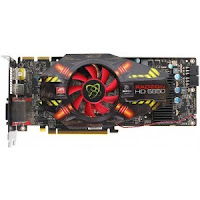 VGA Both were released in the Radeon 5800 series platform is the HD 5850. Although slower than HD5870, this device has the same features, including DX 11, Eyefinity, HDMI Bitstreaming, Supersample Anti-aliasing, and 1 GB of GDDR5 memory. Which makes it more expensive than the HD587 is due to the smaller power consumption and also has a smaller size. As for its speed is comparable with the GTX 285. VGA is quite sold on the market.
1. ATI Radeon HD 5870
 This is it, the best of VGA Card ATI RADEON product, and as you know, this is familiar and famous VGA at Indonesian know. ATI Radeon 5800 series has long been dedicated to the performance of the best video card. It proved so HD5870 is present in the market, this VGA card directly occupy the top level of a single GPU category, and competing with GeForce GTX 480. HD5870 uses GDDR5 1GB and core clock speed of 580Mhz, also supports DirectX 11. The size of the device is rather large, so the installation takes place two slots on the mainboard.

9. ATI Radeon HD 5770

8. Nvidia GeForce GTX 285

7. ATI Radeon HD 4890

6. Nvidia GeForce GTX 465

5. ATI Radeon HD 5830

4. ATI Radeon HD 5970

3. Nvidia GeForce GTX 470

2. ATI Radeon HD 5850

1. ATI Radeon HD 5870

Langganan:
Postingan (Atom)
